
Instant reload methods for 2026
Funding a stablecoin-linked card generally falls into two buckets: pre-funded fiat wallets and auto-conversion. The method you choose dictates how quickly your card works when you tap to pay.
With a pre-funded model, you manually sell stablecoins inside the app to load a fiat balance. This approach is reliable but introduces friction. You must remember to top up before shopping, and the transaction speed depends on the underlying blockchain network congestion and the card issuer's processing time. It works like a traditional prepaid card: you load it, then you spend it.
Auto-conversion offers a smoother experience by converting stablecoins to fiat at the point of sale. This feature is ideal for users who want to spend without managing separate balances. However, it often incurs slightly higher fees per transaction because the issuer handles the conversion in real-time. For most users, this convenience outweighs the small cost difference.
Stablecoin card fees and limits compared
Choosing a stablecoin card means balancing convenience against cost. Most programs operate on a pre-funded model, requiring you to manually sell stablecoins to cover a fiat balance before spending. This friction varies by provider, but the real differentiators are the reload fees, monthly spending caps, and which coins they actually accept. Some cards charge a flat percentage per top-up, while others waive fees for premium tiers or specific stablecoin pairs.
Below is a structured comparison of three major stablecoin card programs. These options represent the most common choices for users looking to spend crypto without triggering complex tax events at the point of sale. Note that limits and fees are subject to change based on your verification level and region.
| Provider | Reload Fee | Monthly Limit | Supported Stablecoins |
|---|---|---|---|
| Stably | 0.9% per transaction | $10,000 | USDC, USDT, DAI, ETH |
| Crypto.com | 0% for Visa Infinite | $50,000+ | CRO, USDC, BTC, ETH |
| Bybit Card | 0% (promotional) | $20,000 | USDT, BTC, ETH, LTC |
When evaluating these options, look beyond the headline fee. A 0.9% reload fee might seem steep, but if the card offers no cashback, it’s a pure cost. Conversely, a card with higher fees might offset that cost through higher cashback rates or exclusive rewards. Always check the specific stablecoin support; not all cards accept USDT or DAI, which can limit your flexibility if you hold multiple types of stablecoins.
For users who prioritize low fees and high limits, the Crypto.com Visa Infinite card stands out, particularly for those already holding CRO. However, for those who want broader stablecoin support without locking up tokens, Stably offers a more neutral platform. The Bybit card is a strong contender for active traders who already hold USDT, offering a promotional fee structure that can be hard to beat.
If you are looking to purchase any of these cards or related accessories, here are some popular options available on Amazon. These products often include hardware wallets or card holders that complement your stablecoin spending strategy.


As an Amazon Associate, we may earn from qualifying purchases.
How to fund your stablecoin card
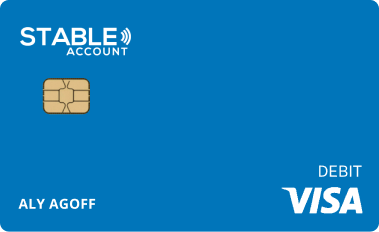
Loading funds onto a stablecoin card is the final step before you can spend. The process varies slightly by provider, but the core workflow remains consistent: verify your account, choose a funding source, and initiate the transfer. For this guide, we use the STABLE Account as the primary example, as it offers a straightforward path from crypto to a physical Visa card.
Before you can load any funds, you must complete the Know Your Customer (KYC) process. For STABLE Account users, this involves signing up and submitting identification documents. Once approved, you will receive your physical card within 6-8 business days [src-serp-2].

Log in to your card provider’s dashboard or mobile app. Navigate to the "Add Money" or "Top-Up" section. Most stablecoin cards allow you to link external wallets, bank accounts, or other crypto exchanges. Ensure your selected source has sufficient balance to cover the transfer amount and any network fees.

Select the "Prepaid Card" option if you are using STABLE Account. The system will prompt you to enter the amount you wish to load. Confirm the details, including the network used for the transaction. Some providers may require you to confirm the transaction via email or SMS for security.

After initiating the transfer, monitor your dashboard for status updates. Most stablecoin top-ups are near-instant, but bank transfers may take 1-3 business days. Once the funds appear in your card balance, you can immediately start using your card for purchases.


As an Amazon Associate, we may earn from qualifying purchases.
Where to buy stablecoin cards
Finding a physical or virtual stablecoin card usually means choosing between a dedicated crypto-native provider or a traditional fintech that has added crypto support. While some platforms issue cards instantly via an app, others require a mailed physical card. The purchasing process is generally straightforward: you complete identity verification (KYC) and fund a linked wallet or bank account.
For readers looking to acquire these cards, major retailers often stock popular prepaid debit options that support crypto top-ups or are issued by crypto-friendly banks. These products allow you to spend stablecoins directly at point-of-sale terminals without manual conversions.

As an Amazon Associate, we may earn from qualifying purchases.
Common funding questions answered
Topping up a stable card sounds simple, but limits and timing can catch you off guard. Knowing how much you can load and how fast the money arrives helps you avoid declined transactions or unexpected fees.
How much can I load onto my stable card?
Most stable card providers set a per-card limit rather than a per-transaction one. For example, the STABLE Visa Card allows you to load up to $20,000 at any time, giving you flexibility for both small daily expenses and larger planned purchases. Check your specific card’s terms, as some prepaid options cap daily loads at $1,000 or $2,500.
How long does it take for funds to appear?
Speed depends on your funding source. Bank transfers (ACH) typically take 1–3 business days to clear. Instant top-ups via debit card or linked apps like Venmo or Cash App usually reflect in minutes, though some providers charge a small fee for this speed. If you’re in a hurry, always verify if instant loading is available for your specific card.
Are there taxes on topped-up funds?
No. Topping up your stable card is not a taxable event. You are simply moving your own money from a bank account or cash source onto a prepaid balance. You do not owe income tax on the loaded amount. However, if your card earns interest (rare for standard prepaid cards) or if you receive a bonus from a promotion, those specific earnings may be taxable. Keep records of your loads for personal budgeting.
As an Amazon Associate, we may earn from qualifying purchases.
No comments yet. Be the first to share your thoughts!